In a previous discussion the desire to have some way to request OAuth scopes on the PDS’s consent screen that represented permission to other accounts that the logged in user was allowed to manage.
For example, if you are a manager of several organization accounts, an app should be able to request permission to create, edit, and delete community.lexicon.calendar.event records on all of your organizations, without obtaining permission to make Bluesky posts under those accounts.
The issue we face with the PDS currently is that we can only request scopes for your own account, not for organization / community accounts that you manage.
In the previous discussion it was decided that it’s a little early to try and be building this into the PDS, so for Roomy I tried out an interesting workaround through our arbiter that I’m going to describe here.
Note: A couple weeks ago I wrote up my plan for this in Arbiter Progress Report 4, which has now been implemented and tested. I’ll go over everything here so you don’t need to read that first, but it could be useful context.
“Virtual” Scopes
The idea is focused around the fact that, while apps cannot create custom scopes for the PDS, they can do something that gets kind of close: they can create permission sets that request custom rpc: scopes.
I’m gonna use Roomy as an example, where we have our own space.roomy.authComplete permission set requested when you login:
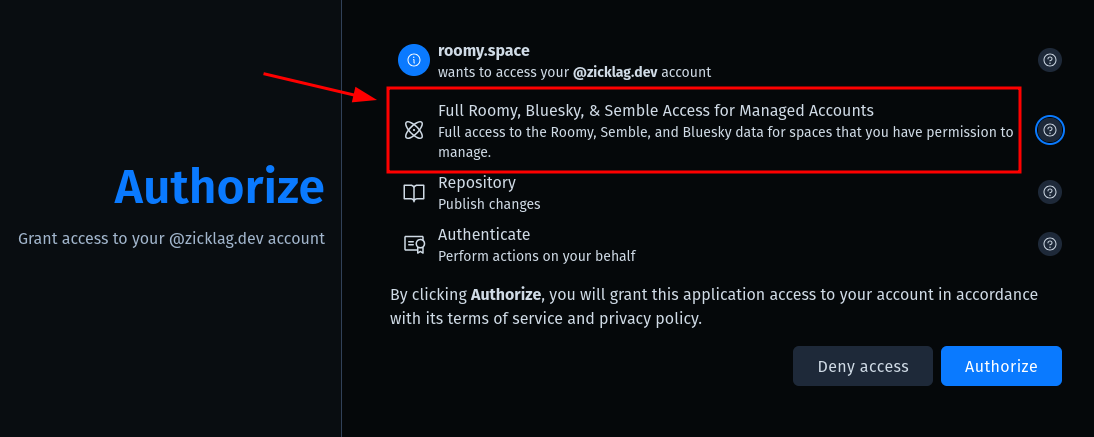
This allows us to show a custom title and description for the permissions that we are requesting when you login.
If you look at the details of the scopes included in the permission set, there is only one rpc: endpoint:
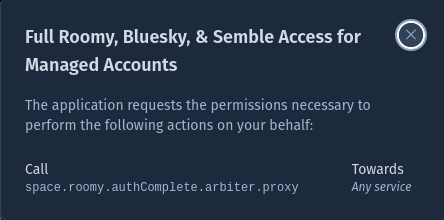
Notice that space.roomy.authComplete.arbiter.proxy is just the same NSID as the permission set with a .arbiter.proxy suffix.
The .arbiter.proxy Endpoint
The .arbiter.proxy suffix is a convention we’re using where any lexicon ending in it are expected to behave according to the town.muni.arbiter.proxy lexicon.
The lexicon defines a way to send or “proxy” an XRPC request to a remote endpoint, under the authority of another DID. When you send a .arbiter.proxy request to the arbiter, it will validate whether or not you have permission to make the request according to the group’s policy and, if you do, it will make the request on your behalf, using the group’s DID.
Revisiting the issue we had in the first place, the problem was that there was no way to scope down the permission granted by the rpc:town.muni.arbiter.proxy scope. If you were an admin of a space, when you logged into an app that requested that scope, you were trusting that app to do anything using your authority for any groups that you were an admin of.
By using a prefix like in rpc:space.roomy.authComplete.arbiter.proxy, we give the arbiter extra information about what the scope of that request is.
If an app sends a request to space.roomy.authComplete.arbiter.proxy, it is subject to the space.roomy.authComplete “virtual scope”. The arbiter will then enforce a “scope policy” that acts as an additional limit to what the app is allowed to do through that endpoint.
Scope Policies
The next question is, what is going to be allowed by the space.roomy.authComplete scope? That is answered by an extra policy that we stick inside the permission set lexicon.
Lexicons allow for us to add custom fields that other apps may not understand and ignore. In this case we add an x-town-muni-arbiter field to the permission set, which is shown in full below ( in YAML so it’s easier to read the multi-line policy );
id: space.roomy.authComplete
defs:
  main:
    type: permission-set
    title: Full Roomy, Bluesky, & Semble Access for Managed Accounts
    detail: Full access to the Roomy, Semble, and Bluesky data for spaces that you have permission to manage.
    permissions:
      - aud: '*'
        lxm:
          - space.roomy.authComplete.arbiter.proxy
        type: permission
        resource: rpc
    x-town-muni-arbiter:
      policy: |-
        # Scope policy
        #   input.method     "GET" | "POST" — the inner request's HTTP method
        #   input.nsid       the inner request's XRPC method NSID
        #   input.parameters query parameters object, or null
        #   input.body       JSON body value, null, or { "$bytes": "<base64>" }
        #   input.encoding   the inner request's content-type, or null

        package arbiter

        default allow := false

        allow if startswith(input.nsid, "space.roomy")
        allow if startswith(input.nsid, "network.cosmic")
        allow if input.nsid == "com.atproto.repo.uploadBlob"
        allow if {
          input.nsid == "com.atproto.repo.putRecord"
          input.body.collection == "app.bsky.actor.profile"
        }
$type: com.atproto.lexicon.schema
lexicon: 1
Notice how the the included policy describes when to allow the request. In this case it allows any NSID starting with space.roomy or network.cosmic, along with blob uploads and writes to bluesky profile records.
When you make a space.roomy.authComplete.arbiter.proxy request to the arbiter it will resolve the permission set, load the policy, and make sure all requests are allowed by the policy before executing them.
Trusting Scopes
It’s important to understand that nothing makes sure the description of the permission set accurately describes the policy. This is unavoidable for now, but to mitigate it we require scopes to be trusted by the group’s arbiter config, for example
{
  "$type": "town.muni.arbiter.config",
  // List of scopes that we allow you to reequest for this community.
  "trustedScopes": [
    "space.roomy.authComplete"
  ],
  "policyLayers": [
    "at://did:plc:cyqufxsezk33hqulcilckna6/town.muni.arbiter.policy/default"
  ],
}
We will need to work on a good flow for installing new trusted scopes. We might be able to do something similar to an OAuth consent screen hosted by the arbiter, where it can attempt to explain what the scope is doing, but I’m not sure about that yet.
Summary
In other words, the groups says, “these are the scopes that I trust to represent themselves appropriately to the user”, the app says “this is the scope I need”, and the PDS looks up the permission set to display the request to the user. Finally the arbiter stops the app from making any requests not allowed by it’s requested scopes.
This is working in Roomy today and will be used for some upcoming integrations that will allow admins to manage their space’s ATProto account from inside of Roomy.
I wanted to explain it here in case anybody had thoughts or wanted to discuss!